 Login AI
UI/UX design for websites and applications
We design websites, customer accounts and business applications. You receive a journey map, a clickable prototype, Figma layouts and descriptions of interface states. For property websites, we connect apartment selection, 2D plans, 3D viewing and enquiries into one journey.
Clear user journeys, responsive screens and files ready for development.
Pricing
from ₽60,000
per project
This is the lower bound of a project. We scope the exact quote after a brief: it depends on volume and the number of integrations.
Capabilities
Journeys and structure
We identify why people open your product and which action they need to complete. We map pages, transitions and roles. On a property website, that means selecting an apartment, comparing layouts, viewing the interior and arranging a visit. Each screen has a defined job and a clear next action.
A Figma prototype
We first show the logic in a clickable prototype. You can follow the main journey and review the order of questions, filters and forms before we draw every detail. We also cover going back, empty search results and failed submissions. Review comments refer to a specific screen and state.
Visual design and responsive layouts
We choose typography, grids, colour and content placement around your brand. We work through desktop and mobile layouts, tables, long names and images with different proportions. Once the concept is approved, we apply it to the remaining screens using consistent rules for buttons, inputs and menu.
Controls for a 3D viewer
We design switching between a plan and a model, room entry points, camera controls and time-of-day selection. Icons receive accessible names, while complex actions have short hints. On phones we account for gestures and touch target sizes. Building the Three.js scene itself is estimated as part of the 3D service.
A working interface example
Delotakt: a workspace for an insolvency practitioner. The case-list screen is shown with demonstration data.
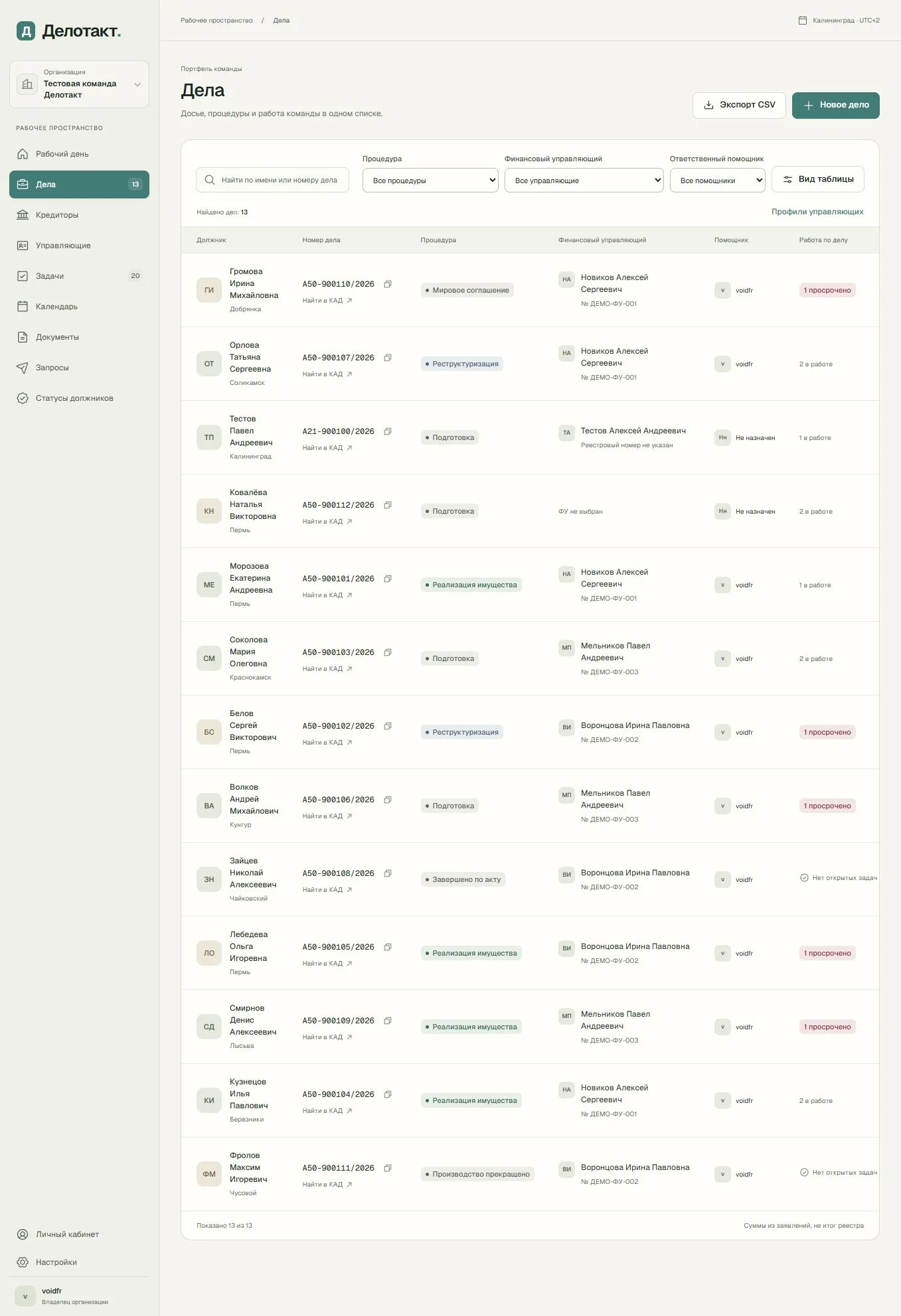
Delotakt · case list
Search by name or case number, filter by procedure and responsible staff, and review statuses and tasks in one table. The sidebar connects cases, documents, the calendar and team work.
From request to result
1
Brief and audit
You share the current website, brand guidelines, analytics and development constraints. We record the audience, primary journey, unique screen list and acceptance criteria. For an existing product, we identify specific points where users lose context or have to enter the same information again. These observations shape the scope.
2
Structure and prototype
We build the structure and a prototype of the main journey. The prototype review ends with recorded decisions about required fields, confirmation steps and error recovery. Additional journeys are added to the agreed scope before visual design starts, so you can see their effect on the work.
3
Layouts and components
After the first screen is approved, we design the remaining pages, mobile layouts and component states. The base delivery includes reusable components for this project. A broader library used across several products, versioning rules and extensive documentation are estimated separately with the team that will maintain them.
4
Review and handover
We review keyboard journeys, contrast, long text, loading and errors. You receive the Figma file, prototype and notes for developers. A review of the implemented interface against the approved layouts can be included as a separate support stage. The handover records which states and screens were checked.
Check if it fits you
Good fit
Online shops and digital services
We design catalogues, search, comparison, product pages, baskets and checkout. For digital services we connect registration, plan selection and customer accounts. This suits teams launching a product or revising screens that make everyday tasks difficult.
Property developers and architecture studios
We design apartment selection, 2D plans, 3D viewing, comparison and visit booking. Camera controls, room transitions and mobile interaction help visitors understand the layout and their next step. We agree these journeys before detailed visual design.
Business software and SaaS
For CRM tools, employee workspaces and subscription products, we design tables, filters, forms and role-specific journeys. We account for empty states, errors, access rights and repeated tasks, then deliver components that your team can develop with the product.
Not a fit
Publishing an approved design
If the layouts are already approved and you only need implementation, choose website development. Branding, copywriting, 3D assets and programming are not part of the base design estimate.
What the delivery includes
Editable layouts
You receive editable Figma layouts with named pages, components, state variants and prepared mobile screens covering the agreed scope.
Clickable prototype
The prototype connects the agreed journeys into a sequence of actions, including entry, selection, confirmation, errors and another attempt.
Interface specification
The interface specification describes input states, spacing rules, menu behaviour and element motion so developers can reproduce the approved decisions.
Checks before kickoff
Primary journeys
We review journeys from the first screen to completion, including returning, cancelling an action and retaining information the user has already entered.
Mobile interface
We review the mobile interface with long headings, an open keyboard, compact tables and touch controls for the apartment model.
Accessible controls
We check accessible controls through keyboard operation, visible focus, icon names and sufficient text contrast on light and dark backgrounds.
Where the solution pushes back
- 01
Screen scope
We estimate screen scope by unique layouts and journeys. An additional role, new page structure or distinct mobile journey changes the estimate.
- 02
User research
User research involving interviews and recruited participants needs a separate budget. The base stage covers supplied materials and an expert review of journeys.
- 03
Development and support
Development, data connections and support after handover are separate stages. The layouts define the appearance and the agreed interface logic for implementation.
Technologies
The technologies we use in our work and their role in a project.
Working files and motion
We use Figma for layouts and prototypes. SVG provides scalable graphics, diagrams and floor plans. GSAP can implement the approved transitions during website development.
Cost calculator
This is an indicative range, not a quote. We scope the exact estimate after a brief: it depends on volume and the number of integrations.
Additional screens beyond five
Five screens, mobile layouts and two review rounds are included. Add any screens beyond five here.Interface complexity
Add-ons
Interviews and research
Extended design system
Service
UI/UX design for websites and applications
The estimate covers our team's work. Hardware, third-party service licences and travel are added on request.
Estimated cost
₽84,000 – ₽131,000
Timeline
2–4 wk
Frequently asked questions
How much does UI/UX design cost?
The initial estimate for five unique screens is RUB 60,000–95,000. The calculator allows RUB 20,000–35,000 for structure and concept, plus RUB 8,000–12,000 per screen. These are our planning estimates for the work, not a fixed quotation. We confirm the scope and final price after reviewing your screen list and source materials.
What counts as one screen?
One screen is a distinct page or view with its own task and layout. Standard button states and responsive adaptations of an agreed screen are included in the base work. A new journey, a complex table with a separate editing mode or a different user role may require an additional screen. We record these decisions in the scope list.
Can I order an audit or a prototype only?
Yes. We agree a standalone stage with a page list and a defined result: either prioritised findings or a prototype for the selected journey. The calculator estimates a complete design cycle. For an individual stage, we quote the actual work so you can continue with your own team and keep the files.
How do design revisions work?
The estimate includes two consolidated feedback rounds within the agreed scope. You collect comments in one place; we record decisions and issue the next version. A change to the business journey after prototype approval is discussed separately. This process keeps approved decisions visible and makes the effect of additional requests clear.
Can you implement the interface?
Yes, implementation is a separate stage. Before starting, we agree the stack, forms, data, integrations, deployment and support. For a 3D viewer, we also define the model, target devices and camera behaviour. The Figma handover remains a standalone deliverable, so you can give it to your own development team if you prefer.
What teams add to this service
Related Services
3D design
Archviz from your drawings, 2D plans and interactive scenes for your website.
Corporate Websites
A modern company website: presentation, trust, and a flow of leads.
Landing Pages
High-converting one-pagers that turn visitors into customers.
Software Development
We build reliable software for your needs: from web services to AI platforms.
Part of Solutions
Ready to discuss your task?
Leave a request – we'll get back with a proposal and a preliminary estimate.
Contact us